
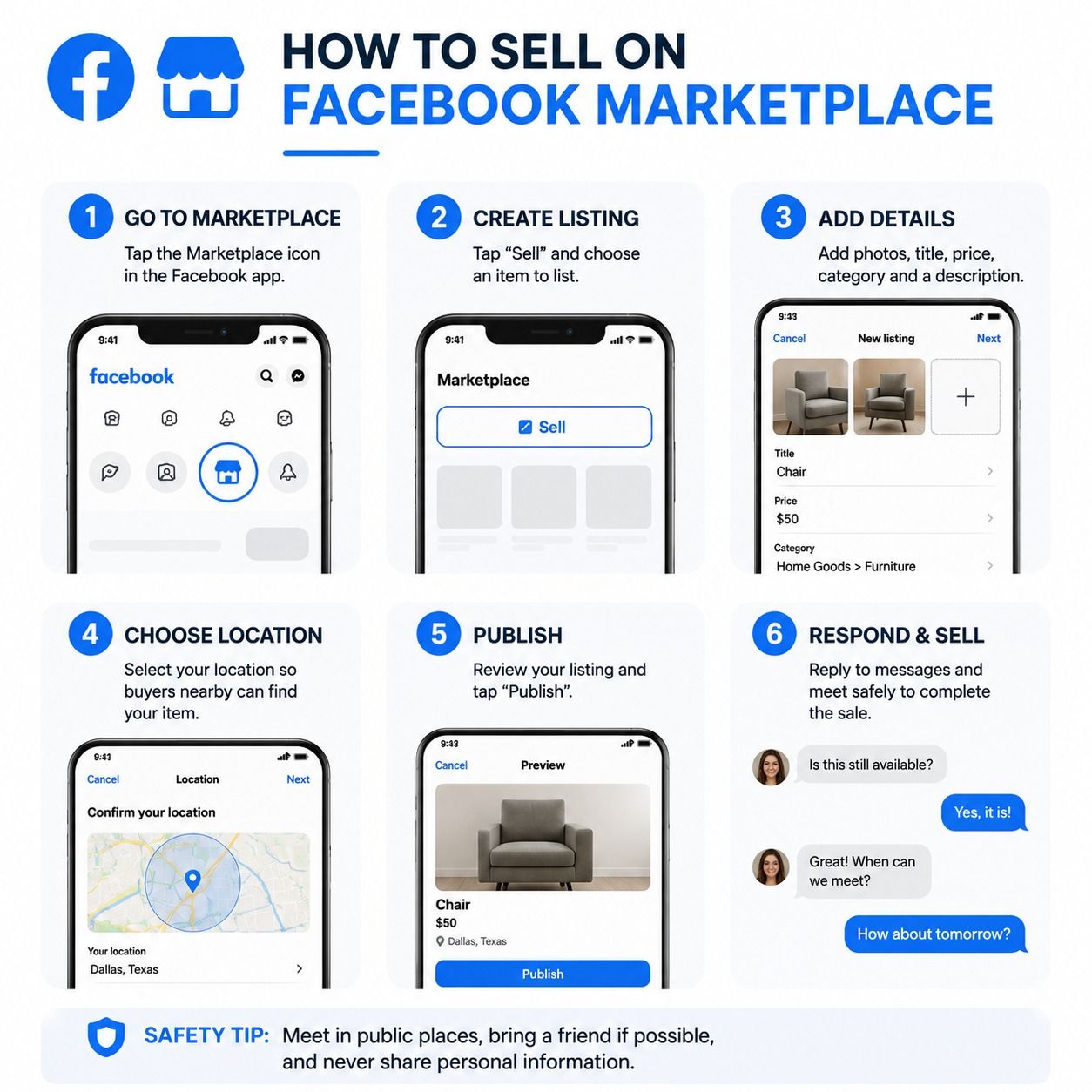
Facebook Marketplace has become one of the fastest-growing platforms in the United States for buying and selling used and new products. With millions of active users, it works like a digital garage sale inside Facebook where anyone can list items, connect with local buyers, and earn money quickly.
Whether you’re selling old furniture, electronics, clothes, or even running a small business, Facebook Marketplace can turn unused items into cash within hours.
This guide will walk you step by step on how to sell on Facebook Marketplace successfully, even if you are a beginner.
What Is Facebook Marketplace?
Facebook Marketplace is a free feature inside the Facebook app and website where users can:
-
Buy and sell items locally or nationally
-
List products for free
-
Chat directly with buyers
-
Negotiate prices in real time
It works like Craigslist or eBay but with the advantage of Facebook’s social network trust system.
Step 1: Set Up Your Facebook Account
Before selling, make sure your Facebook profile is:
-
Real and active
-
Has a profile picture
-
Has basic personal information filled in
-
At least a few friends or activity (helps build trust)
Facebook uses trust signals to reduce scams, so a complete profile increases your chances of selling faster.
Step 2: Go to Facebook Marketplace
To access Marketplace:
-
Open the Facebook app or website
-
Click the “Marketplace” icon (shop symbol)
-
Tap “Create New Listing”
You will see different listing options such as:
-
Item for sale
-
Vehicle for sale
-
Home for sale or rent
For most users, choose “Item for Sale.”
Step 3: Take High-Quality Photos
Photos are the first thing buyers see. Poor images mean fewer sales.
Tips for better photos:
-
Use natural lighting
-
Take multiple angles
-
Show any damage honestly
-
Keep background clean
-
Avoid filters
Good images can increase your chances of selling by 2–3 times.
Step 4: Write a Clear Product Title
Your title should be simple and searchable.
Examples:
-
“Used iPhone 12 – Excellent Condition”
-
“Wood Dining Table – Solid Oak”
-
“Nike Running Shoes Size 10”
Avoid vague titles like “Good item” or “Nice product.”
Step 5: Write a Detailed Description
Your description should include:
-
Condition (new, used, like new)
-
Brand and model
-
Size or specifications
-
Reason for selling
-
Any defects or issues
Example: “This iPhone 12 is in excellent condition with no cracks. Battery health is 88%. Comes with original charger.”
Honesty builds trust and reduces refund or complaint issues.
Step 6: Set the Right Price
Pricing is very important on Facebook Marketplace.
Tips:
-
Check similar listings
-
Start slightly higher to allow negotiation
-
Offer bundle discounts if needed
-
Don’t overprice used items
If you price too high, your listing will get ignored.
Step 7: Choose Your Location and Delivery Option
You can choose:
-
Local pickup (most common)
-
Shipping (for wider audience)
Local pickup is faster and safer for bulky items.
Always meet in public places like:
-
Police station parking lots
-
Shopping centers
-
Busy public areas
Step 8: Publish Your Listing
After filling all details:
-
Click “Publish”
-
Your item will appear in Marketplace
-
Buyers can now message you directly
You will receive messages in Facebook Messenger.
Step 9: Communicate with Buyers
When buyers contact you:
-
Respond quickly
-
Be polite and clear
-
Avoid sharing personal information
-
Negotiate reasonably
Fast responses often lead to faster sales.
Step 10: Close the Sale Safely
When selling:
-
Accept cash or secure digital payments
-
Verify payment before handing over item
-
Meet in safe public locations
-
Avoid shipping scams unless using Facebook-approved shipping
Pro Tips to Sell Faster on Facebook Marketplace
-
Renew your listing every few days
-
Join local selling groups
-
Use keywords in your title
-
Post during evenings or weekends
-
Offer “slightly negotiable” pricing
These small steps increase visibility significantly.
Common Mistakes to Avoid
-
Using blurry photos
-
Writing incomplete descriptions
-
Overpricing items
-
Ignoring buyer messages
-
Meeting in unsafe locations
Avoiding these mistakes can dramatically improve your sales success.
Benefits of Selling on Facebook Marketplace
-
Free to use
-
Huge audience in the USA
-
Fast local sales
-
Easy communication
-
No listing fees
It’s one of the simplest ways to start earning money online without a website or investment.
FAQ – How to Sell on Facebook Marketplace
1. Is Facebook Marketplace free to use?
Yes, listing items is completely free for most users.
2. What can I sell on Facebook Marketplace?
You can sell furniture, electronics, clothes, cars, and almost any legal item.
3. How do I get paid on Facebook Marketplace?
Most sellers use cash, PayPal, Venmo, or Facebook checkout (if available).
4. Is Facebook Marketplace safe?
Yes, if you follow safety rules like meeting in public places and avoiding scams.
5. Why is my item not selling?
It may be overpriced, have poor photos, or lack visibility.
6. Can I sell without a Facebook account?
No, you need an active Facebook profile.
7. How long does it take to sell an item?
It can take minutes to days depending on demand and pricing.
8. Do I need a business to sell?
No, individuals can sell personal items easily.
9. Can I ship items on Facebook Marketplace?
Yes, but only for eligible items and with Facebook-supported shipping options.
10. How do I boost my listing?
Use better photos, correct keywords, and join local Facebook selling groups.